Bolt.new logoVibe-coding platform·StackBlitz

Bolt.new + Powabase

Bolt writes and ships the app. Powabase is the backend it calls.

Bolt.new builds and deploys full-stack apps without leaving the browser. Give it a Powabase project and it wires sign-in, data and search into whatever it ships.

Rather have it built? Powabase engineers build MVPs free for annual Scale and Enterprise plans.

Quick start

Three steps and Bolt.new is building on Powabase.

  1. 1

    Create a Powabase project

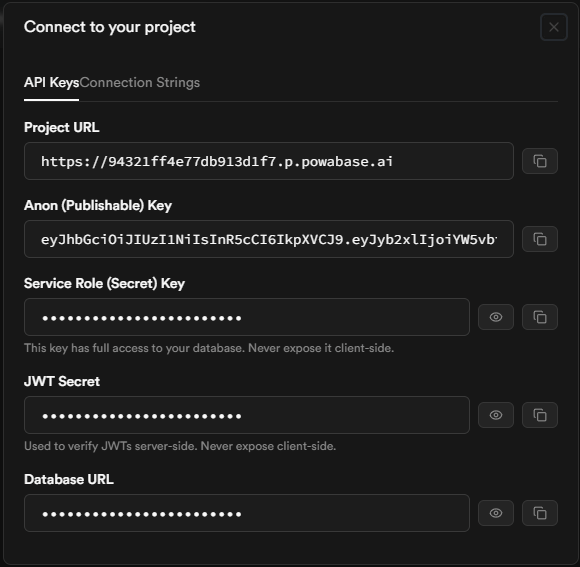
    Create a project at app.powabase.ai and open the Connect dialog (top-left in Studio). Copy the Project URL and the Service Role (Secret) Key. The Service Role key reaches everything: the agent and AI endpoints, plus full database access. Keep it on the server and never put it in the browser.

    The Powabase Connect dialog showing the Project URL, Anon key, Service Role key, JWT secret, and Database URL
    The Connect dialog in Powabase Studio.
  2. 2

    Add the keys in Bolt

    Set the Project URL and Service Role key in Bolt's server environment so the app can reach Powabase. Keep the key off the client.

    Environment
    BASE_URL=<Project URL>
    API_KEY=<Service Role (Secret) Key>
  3. 3

    Describe the app

    Tell Bolt what to build. It scaffolds and runs the app against Powabase. Pick an example below to start.

Example apps

Real apps, each from one prompt. Copy any of them and give it to Bolt.new.

RAG support chatbot

Ingest our product docs, help center, and resolved tickets into a knowledge base, embedding on upload. Expose a support agent that answers with inline citations, streams over SSE, and hands off to a human when confidence is low. Add email and Google sign-in, isolate every conversation per organization with row-level security, and ship it as an embeddable chat widget.

Internal knowledge assistant

Index our wikis, runbooks, and exported threads into a knowledge base, chunking and embedding on upload. Expose an agent that answers with citations and respects per-department access, keep it fresh with scheduled re-indexing of changed sources, and add SSO sign-in plus an analytics view of unanswered questions.

AI help desk

Model tickets, organizations, and agents with row-level security, and auto-triage incoming tickets with an agent that predicts category and priority and drafts a reply from the knowledge base. Escalate low-confidence cases, run SLA timers as scheduled jobs, add email auth, and provide a live queue dashboard.

Sales CRM

Model companies, contacts, deals, and activities in Postgres with row-level security per team and roles for reps and managers. Build a pipeline board with stage tracking, an activity timeline, and semantic search across notes, plus a dashboard of weighted pipeline and win rate. Wire OAuth sign-in and an audit log of every change.

News monitoring app

Pull RSS feeds and news APIs on a schedule, deduplicate and embed each article, and run an agent that clusters related stories, summarizes them, and tags entities and sentiment. Let users define watchlists and alert rules, isolate data per workspace, and deliver a realtime feed plus a daily email digest via a cron job.

Invoice & receipt automation

Accept PDF and image uploads to storage, then extract vendor, line items, totals, and dates with an extraction agent and write validated records to Postgres, routing low-confidence fields to human review. Add approval workflows, per-team access control, exports to accounting formats, and a searchable archive.

Bolt's Supabase option isn't the way to connect Powabase. It authorizes one supabase.com organization for your Bolt account, and the database panel's Connect button then lists that organization's projects, so a Powabase project never appears. Leave it alone: add BASE_URL and the Service Role key in Secrets and let a server function call the Powabase API.

Bolt.new docs

Where Bolt.new keeps your keys

Bolt keeps secrets in the Secrets tab of its database panel (the database icon at the top center of a project), and only server functions can read them. That's where BASE_URL and the Service Role key belong, with a server function making the Powabase calls. A .env value prefixed VITE_ is bundled into the browser by Vite, so the Anon key is the only Powabase key that can live there. People you share a project with as viewers never see its environment variables.

Bolt.new docs

Connect over MCP

Add it from Chatbox + → Connectors → Manage connectors → Custom MCP server (GUI form).

GUI form
Name:            Powabase
URL:             https://mcp.powabase.ai/mcp
Transport type:  HTTP
Authentication:  MCP OAuth

Click Connect and sign in to Powabase. Bolt shows Connected when it's done.

Connectors live in your account settings, and you turn one on per project from the chatbox (+ → Connectors → toggle), or tick Auto-enable for all projects to have it on in every new project. The tools you enable apply to every project, so switch off any Powabase write tools you don't want Bolt calling. Only a project's owner can connect MCP servers.

Append ?read_only=true to the MCP URL and the server exposes only the tools that don't write. We use it for sessions that should inspect a project and never mutate it.

Bolt.new MCP docs

Bolt.new example

Server function
// The browser calls this server function; only the function talks to Powabase.
const cors = {
  "Access-Control-Allow-Origin": "*",
  "Access-Control-Allow-Methods": "POST, OPTIONS",
  "Access-Control-Allow-Headers": "authorization, x-client-info, apikey, content-type",
};

Deno.serve(async (req) => {
  if (req.method === "OPTIONS") return new Response(null, { headers: cors });
  const { query } = await req.json();
  const key = Deno.env.get("API_KEY")!; // Secret: Service Role (Secret) Key
  const url = `${Deno.env.get("BASE_URL")}/api/knowledge-bases/${Deno.env.get("KB_ID")}/search`;
  const res = await fetch(url, {
    method: "POST",
    headers: { apikey: key, Authorization: `Bearer ${key}`, "Content-Type": "application/json" },
    body: JSON.stringify({ query, top_k: 5, retrieval_method: "hybrid" }),
  });
  const headers = { ...cors, "Content-Type": "application/json" };
  return new Response(await res.text(), { status: res.status, headers });
});

This is written in the Deno edge-function style. If your project's server functions look different, ask Bolt to port the fetch, which is the part that matters. The CORS headers are a superset of the ones in Bolt's troubleshooting guide, so a frontend calling through supabase.functions.invoke gets through. KB_ID is a third Secret holding your knowledge base's ID. Before this goes live, check the caller is a signed-in user so strangers can't spend your key.

Connecting to Powabase from any tool

Mechanics that don’t change from tool to tool.

Anon (Publishable) Key
Client-side
Respects Row Level Security, so it's safe to ship to a browser.
Service Role (Secret) Key
Server-side only
Bypasses RLS. Never put it in anything that ships to a browser.
Keys & RLS docs ↗
  • Every call to /api/* or /rest/v1/* needs two headers, apikey and Authorization: Bearer, both set to the same key. Sending only one is the most common cause of a 401.

    Docs
  • The Database URL from the Connect modal is PgBouncer in transaction mode, not a direct Postgres connection. Disable prepared statements in your driver, or you'll hit prepared statement "..." does not exist. No LISTEN/NOTIFY and no session-level SET across statements. Use Realtime for change notifications; SET LOCAL inside a transaction otherwise. The username and database in the URL are both your project ref, not postgres.

    Docs
  • @supabase/supabase-js mostly works for the BaaS surface (PostgREST, Auth, Storage, Realtime) when you point it at your project URL with the Anon key. It doesn't cover the /api/* AI surface (agents, knowledge bases, orchestrations), which you call over plain REST. There's no /graphql/v1 route: point any GraphQL client at POST /rest/v1/rpc/graphql instead.

    Docs

Common errors

CORS error in the browser console when the app calls your server function
Cause: The function doesn't answer the browser's OPTIONS preflight or doesn't send Access-Control-Allow-* headers.
Fix: Return the CORS headers on every response and handle OPTIONS, as in the example above. Bolt's Plan mode can check this for you.
The preview goes blank after you add the Powabase call
Cause: A variable the code expects, such as BASE_URL, isn't set. Bolt previews often show a white screen when required variables are missing.
Fix: Ask Bolt to list every environment variable the project needs, then add the server-side ones, BASE_URL and API_KEY, in Secrets.
The Service Role key is readable in the browser
Cause: It was put in .env as a VITE_ variable, and Vite bundles those into client code.
Fix: Move it to Secrets under a name without the VITE_ prefix and read it only in a server function. If it shipped, rotate it in Studio.
401 Unauthorized
Cause: Only one of the apikey / Authorization headers was sent.
Fix: Send both, set to the same key. Docs
prepared statement "..." does not exist
Cause: PgBouncer's transaction-mode pooler moved you to a different server connection.
Fix: Disable prepared statements in your driver's config. Docs
A query that should return rows comes back empty, or a write is silently rejected
Cause: Row Level Security on your own tables. New public tables ship with RLS off, but once you add policies they gate every request.
Fix: Check the policy's USING/WITH CHECK clause and confirm which role (anon, authenticated, service_role) you actually authenticated as. Docs

FAQ

For most Bolt apps, Bolt Database is the easier choice. Bolt creates it when the app needs one, and it comes with sign-in, file storage, server functions, and secrets in one panel. Bring your own backend when the app needs more than tables and sign-in, such as knowledge bases, retrieval, agents, and workflows next to its Postgres data, or when you want the backend to outlive the tool that generated the frontend. Powabase is built for that second case.

Yes. Keep the Powabase key in Bolt's Secrets and make the calls from a server function, while Powabase runs the agents, knowledge bases and any data you keep there. Keep each table in one place so the app has a single source of truth.

No. Bolt's Supabase connection authorizes one supabase.com organization for your Bolt account, and only that organization's projects show up. Powabase connects through Secrets and a server function, and optionally as a custom MCP connector for Bolt's chat.

Yes. Bolt calls them Connectors. It has built-in ones for tools like Notion, Linear, and GitHub, and any remote server can be added as a Custom MCP server: for Powabase, name it, paste https://mcp.powabase.ai/mcp, pick HTTP as the transport and MCP OAuth for authentication, then click Connect.

No. A connector gives Bolt's chat context and tools while you build, so it can look at your tables or run a query for you. The app you publish still needs a server function and Secrets to call Powabase when your users use it.

Yes. If the project already has a Bolt database, connecting a Supabase database replaces that connection and can lose data; Bolt suggests claiming the Bolt database in Supabase instead if you want to keep it. Adding Powabase through Secrets and server functions doesn't touch the project's database connection.